 GiftCoves
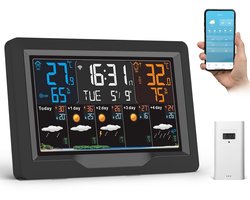
jely WiFi Weather Station with Outdoor Sensor – Wireless Weather Station with App, 7.5'' Color Display, Thermometer & Hygrometer Indoor/Outdoor, 5 Days Weather Forecast, UV Index, Clock
bij 1 winkel
Verwant
Streepjescode: 9101026593673

Alle aanbiedingen
- bol.comjely WiFi Weather Station with Outdoor Sensor – Wireless Weather Station with App, 7.5'' Color Display, Thermometer & Hygrometer Indoor/Outdoor, 5 Days Weather Forecast, UV Index, ClockNaar de winkel€ 136,33Op voorraad
We verdienen mogelijk commissie als je via deze link koopt. Wat jij betaalt verandert niet.
Over dit product
From the brand jely weather station with sensor jely weather station monitors temperature and humidity in real time and provides a weather forecast for the next 12–24 hours. Previous page About jely jely delivers smart, accurate temperature and humidity monitoring, designed to create healthier and more comfortable living spaces. With reliable sensors, modern design and user-centric innovation, jely helps you understand your environment and make every day more comfortable. jely weather station with sensor Next page Product Description Jely Weather Station with Tuya/Smartlife app connection, your personal weather report This WiFi weather station with outdoor sensor is designed to deliver accurate real-time weather data directly to your fingertips. The Wi-Fi termometer station with outdoor sensor connects to your home or office Wi-Fi network (2.4 GHz), allowing you to access real-time weather data via the app (Tuya/SmartLife) How to connect your Wi-Fi weather station to the Tuya/Smartlife app? (Please note: The WLAN connection is only possible with a 2.4 G Hz network and requires power supply via the adapter.) 1st Download the Tuya Smart App Go to the App Store and search for the "Tuya Smart"/"Smartlife" app. Download and install them on your smartphone or tablet. 2nd Create a Tuya/SmartLife account Open the Tuya/SmartLife app and sign up for an account. If you already have an account, just sign up. Add 3rd Device Tap the "+" icon at the top right to add a new device. 4th Connect to your Wi-Fi Select the Wi-Fi you want to connect to and enter the Wi-Fi account and password. 5. Link your weather station Follow the on-screen instructions and the Tuya/SmartLife app will be successfully linked to your weather station. You can adjust the settings and preferences within the…
Omschrijving aangeleverd door bol.com.