 GiftCoves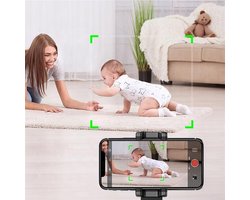
Apai Genie 360° houder voor objecttracking -TikTok- Auto Object Tracking Houder Smartphone - 360 Graden Selfie Stick - Mount Telefoon - Automatisch Volgen - Bewegingssensor Statief - Bewegende Beelden - Video & foto’s - iPhone & Android - Zwart
bij 1 winkel
Verwant
Streepjescode: 7446049392301

Alle aanbiedingen
- bol.comApai Genie 360° houder voor objecttracking -TikTok- Auto Object Tracking Houder Smartphone - 360 Graden Selfie Stick - Mount Telefoon - Automatisch Volgen - Bewegingssensor Statief - Bewegende Beelden - Video & foto’s - iPhone & Android - ZwartNaar de winkel€ 22,99Op voorraad
We verdienen mogelijk commissie als je via deze link koopt. Wat jij betaalt verandert niet.
Over dit product
For the TikTok follow recording holder, pls pay attention to below key steps
Step one: Long press the power button to turn on the holder.
( Then you will see the the blue LED flash....it means mobile holder is waiting bluetooth connection)
Step two: Open the APP--SOUING, then you will see the APP ask for bluetooth connection permission. Just allow it.
( Here pay attetion that, don't need to open mobile bluetooth in advance, just when open APP, APP will remind connection bluetooth, only need give permision)
Step three: After you give permission to connect bluetooth, you will see below remind information: connection successed.
Step four: After you see the" connectiion Succeeded " , and blue LED will stop flashing. then click the right side "Video icon"
Step five: After you click this video icon, then click start as blow
Important Step six: Here come to the important step , you must allow APP to get the permission to float show over other APPs as below
Important Step Seven: After you give above permission, you will see below icon float on the screen: "Stop" float on the screen.
Step Eight: After you see the icon" Stop " float on the screen. Then you can open any video talking APP, like skype, facebook start video talking.
Important Step Nine: Here also a very important step, you must make sure your own video page show on the big window, your other side talking friends can only
show on small window, if yourself video page show on small window, the holder may not follow .
Wil je leuke en/of professionele bewegende video opnames maken met je smartphone? Met ApaiGenie 360 graden object tracking houder kan je professionele bewegende opnames maken met je smartphone! Deze slimme houder is ideaal voor vloggers, tiktok-gebruikers, ondernemers die regelmatig voor de camera staan en voor het…
Omschrijving aangeleverd door bol.com.